📚 PUBLISHED BOOKS LIBRARY 📚
Your Sims’ books, on every bookcase in town.
Ever wished you could get back a book your Sim published? In the base game, publishing a book (self-publishing or selling it to a publisher) destroys it forever: all you keep are the royalties. Published Books Library changes that: every book published in your save is added to a shared catalogue, and ANY Sim can buy a copy of it at ANY bookcase. And every copy sold pays royalties to its author: will your Sim write the next bestseller?
━━━━━━━━━━━━━━━━━━━━
✨ FEATURES
━━━━━━━━━━━━━━━━━━━━
• Every book published by any Sim of your save is recorded automatically: self-published books AND books sold to a publisher, from a regular mailbox or a City Living wall mailbox.
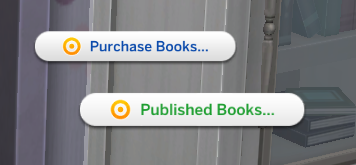
• A new « Published Books… » interaction on every bookcase: at home, in public libraries, on community lots, from every pack.
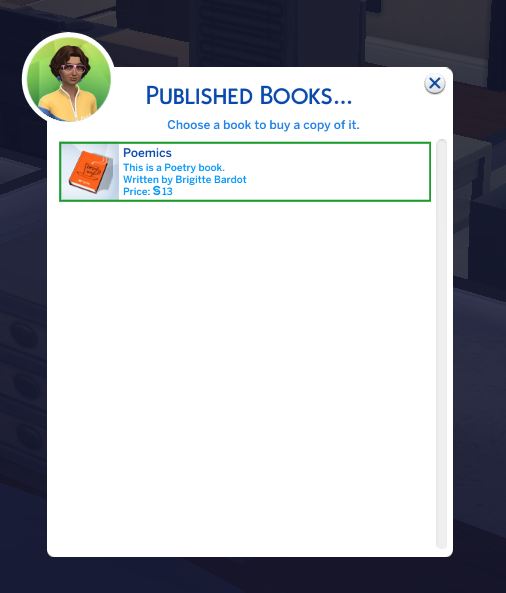
• The catalogue shows each book’s cover, title, the description your Sim wrote, « Written by <First Name> <Last Name> » and its price.
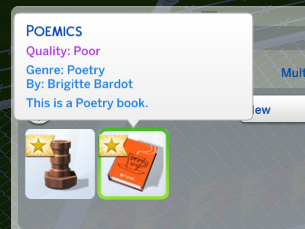
• The copy you buy is identical to the original: same title, description, author, genre and quality.
• Fair price: half of the book’s value when it was published (minimum §10), so better books cost more.
• If the household can’t afford a book, it is greyed out with a « Not enough simoleons. » note and can’t be bought.
• Royalties: every time another household buys a copy, the author’s household earns half of the price, with a notification if the author is in your household.
• Sales counter: each book shows how many copies it sold, and the catalogue lists the best sellers first.
• Bestsellers: after 5 copies sold, a book gets a « Bestseller! » badge and its author a notification.
• Each save has its own catalogue, saved alongside your game (Save As and travelling are supported).
• Translated in English, French, Spanish, German and Italian. Other game languages display English.
• No dependency: you do NOT need Sims 4 Community Library (S4CL) or any other mod.
━━━━━━━━━━━━━━━━━━━━
📋 REQUIREMENTS
━━━━━━━━━━━━━━━━━━━━
• Base game only (no pack required).
• Script mods must be enabled: Game Options > Other > « Script Mods Allowed », then restart the game.
• Tested on game version 1.128.90.1230.
━━━━━━━━━━━━━━━━━━━━
💾 INSTALLATION
━━━━━━━━━━━━━━━━━━━━
1. Download and unzip the file.
2. Move the « PublishedBooksLibrary » folder (with its 2 files) into your Mods folder:
Documents > Electronic Arts > The Sims 4 > Mods
3. Make sure both files are there:
• PublishedBooksLibrary.ts4script
• PublishedBooksLibrary.package
⚠️ The .ts4script file must not be more than ONE folder deep inside Mods.
4. Start the game and make sure script mods are enabled.
━━━━━━━━━━━━━━━━━━━━
🎮 HOW TO USE
━━━━━━━━━━━━━━━━━━━━
1. Have a Sim write a book on a computer.
2. Publish it at a mailbox (self-publish or sell to a publisher).
3. Click any bookcase > « Published Books… ».
4. Pick a book: the price is taken from your household funds and the copy goes straight to your Sim’s inventory.
━━━━━━━━━━━━━━━━━━━━
❓ FAQ & KNOWN LIMITATIONS
━━━━━━━━━━━━━━━━━━━━
• Books published BEFORE installing the mod can’t be recovered: the game had already deleted them. Only books published after installation appear.
• The option is greyed out until at least one book has been published in your save.
• Where is the catalogue saved? In Documents > Electronic Arts > The Sims 4 > saves > PublishedBooks. Keep this folder with your saves if you back them up or move them to another computer.
• Buying your own books (same household) doesn’t pay royalties and doesn’t count as a sale.
• If you publish a book and quit WITHOUT saving, then reload the same save without restarting the game, that book may still show up in the catalogue.
• Want to see the whole catalogue? Open the cheat console (Ctrl + Shift + C) and type: publishedbooks.list
• Compatibility with other mods that change book publishing hasn’t been tested. Please tell me if you run into a conflict!
━━━━━━━━━━━━━━━━━━━━
🐞 FOUND A BUG?
━━━━━━━━━━━━━━━━━━━━
Please leave a comment with:
• what you were doing when it happened,
• the file Documents > Electronic Arts > The Sims 4 > Mods > PublishedBooks.log,
• your last exception file (lastException.txt, or mc_lastexception.html if you use MC Command Center).
━━━━━━━━━━━━━━━━━━━━
🗑️ UNINSTALL
━━━━━━━━━━━━━━━━━━━━
Delete the « PublishedBooksLibrary » folder from your Mods folder. Your saves stay safe. You can also delete the « saves > PublishedBooks » folder if you don’t plan to reinstall the mod.
━━━━━━━━━━━━━━━━━━━━
🌍 TRANSLATIONS
━━━━━━━━━━━━━━━━━━━━
English, French, Spanish, German, Italian.
Spotted a mistake or want to translate the mod into your language? Leave a comment, there are only a few short sentences to translate!
Community translations (made and hosted by their translators: download the file and put it in your Mods folder, next to the mod):
• Polish by mae_sim: https://www.patreon.com/mae_sim/posts/published-books-172989957
━━━━━━━━━━━━━━━━━━━━
📝 CHANGELOG
━━━━━━━━━━━━━━━━━━━━
v1.1.0: royalties for authors, sales counter, bestsellers.
v1.0.0: first release.
━━━━━━━━━━━━━━━━━━━━
💜 CREDITS & TERMS
━━━━━━━━━━━━━━━━━━━━
Made by Little Unicorn.
Free for everyone. Please don’t re-upload this mod anywhere else or claim it as your own: share the link to this post instead: [LINK TO THIS POST]
Happy writing, and happy reading! 📖